
Canta Debloater
Screenshots
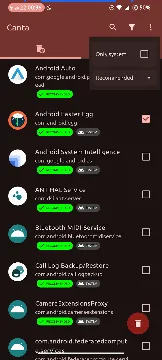
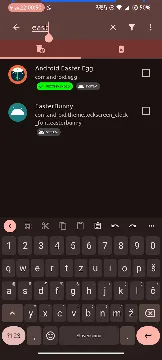
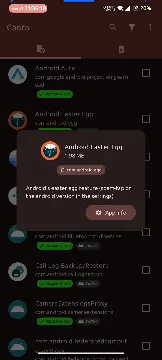
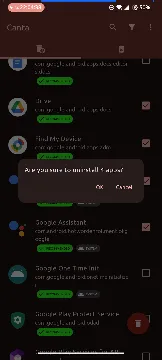
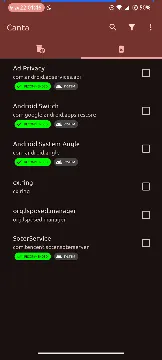
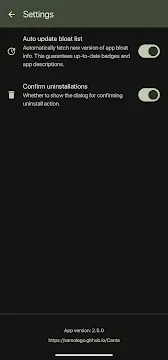
Canta Debloater helps you clean your mobile device easily. Many phone manufacturers install unwanted software on your device. These pre-installed apps take up valuable storage space. They also drain your battery in the background. Therefore, many users want a clean phone experience. You can easily remove these annoying apps now. You do not even need root access to do this.
This helpful guide will explain how the app works. We will show you how to maximize your device performance. Let us explore the true benefits of this tool. Many devices come with specific types of bloatware. These include pre-installed social media clients. They also include redundant manufacturer web browsers. Unwanted music and video players waste your space. Carrier-branded diagnostic tools also run constantly. Consequently, these packages slow down system performance. Canta Debloater offers an excellent solution for this exact problem. You can regain control over your phone today.
What Is Canta Debloater?
Canta Debloater is an open-source tool for mobile users. The tool targets hidden bloatware that slows down your system. Usually, you need root privileges to delete system files. However, this app uses a completely different method. It connects with another tool called Shizuku. Shizuku provides the necessary permissions through wireless debugging.
Consequently, you can delete any app safely. The tool works for the current user profile. Therefore, you do not modify the core system permanently. You can always restore the apps later if you make a mistake. This feature makes the app highly secure for beginners. You can clean your phone without risking a system crash.
Furthermore, the open-source nature ensures complete transparency. Developers inspect the code regularly to verify its safety. You do not have to worry about hidden malware. It offers a clean way to manage system resources. Many users prefer open-source software for security reasons. This tool respects user privacy completely. It does not send your data to unknown external servers.
Why Remove System Apps From Your Phone?
Manufacturers often load phones with unnecessary software. These files reduce your available internal storage space significantly. Furthermore, many of these background programs track your daily activities. They send data back to distant servers without your explicit knowledge. This constant background activity uses a lot of mobile data. It also shortens your battery life during the day.
When you remove these programs, you reclaim your device. Your phone will process everyday tasks much faster. You will notice smoother animations during daily use. Free storage space also allows you to download better media. Bloatware causes several major issues on modern phones:
- High consumption of system RAM.
- Constant background battery drainage.
- Unwanted notifications and advertisements.
- Reduced privacy due to telemetry data.
Therefore, removing these apps is highly beneficial. Ultimately, a clean operating system respects your personal privacy. You notice the performance improvement immediately after cleaning.
Top Features of Canta Debloater
Canta Debloater offers several options to improve your user experience. First, the app categorizes your apps clearly. It identifies which apps are safe to remove immediately. It also warns you about critical system files. Therefore, you will not accidentally delete your phone launcher.
Second, the tool supports batch uninstallation. You can select multiple programs at once. Then, you can delete them with a single tap. This saves a lot of time during initial setup. Third, the app keeps a record of deleted files. Because of this, uninstallation is never permanent. You can restore any package within a few seconds. Here is a summary of the main features:
- Clear safety labels for every package.
- Fast batch processing for quick deletion.
- Easy restoration of uninstalled system apps.
- No root required for any operation.
These features give you full control over your device. Furthermore, the layout is clean and simple. Anyone can navigate the menus without technical training.
How to Set Up Shizuku Correctly
The app requires Shizuku to execute commands. First, you must download Shizuku on your device. Next, open your phone settings and find the build number. Tap this number seven times to unlock developer options. Then, enter the developer options menu.
Enable the wireless debugging feature toggle. Shizuku will request a pairing code to connect. Enter the code in the notification panel carefully. Finally, start the Shizuku service. Once Shizuku runs successfully, open the uninstaller app. Grant the necessary permissions to link the two tools. Now you are ready to manage your files. Make sure you follow these specific conditions:
- Connect to a stable Wi-Fi network.
- Keep developer options enabled at all times.
- Allow background execution for both apps.
Then, the connection will remain stable during the process. This setup takes less than five minutes. After the initial setup, reconnection happens automatically.
Benefits of Using Canta Debloater Regularly
Using Canta Debloater regularly maintains your system health over time. New system updates often introduce new unwanted software. Therefore, you should check your app list periodically. The app helps you monitor new additions easily. Removing background clutter frees up your random access memory.
As a result, mobile games run much better. You will experience fewer frame drops during intense gameplay sessions. Furthermore, the tool itself contains zero advertisements. It does not track your personal information either. You get a clean interface without annoying popups. It provides a straightforward solution for ongoing performance issues. Regular cleaning provides noticeable advantages:
- Extended overall battery longevity.
- More space for personal photos and videos.
- Improved device responsiveness under heavy load.
- Reduced background network data consumption.
Consequently, your device feels brand new for longer. You protect your hardware from unnecessary wear.
Conclusion
Managing your device should not be a difficult task. Canta Debloater simplifies the entire process for everyone. You can easily remove stubborn software without rooting your phone. The app relies on Shizuku for secure execution. However, you must always read the safety warnings carefully.
Removing the wrong file can cause minor system glitches. Fortunately, the restoration feature protects you from permanent damage. Take control of your phone storage today. Enjoy a faster and cleaner mobile experience right now. The tool provides independence from restrictive factory settings. Try it today to unlock your phone’s true potential. You will appreciate the extra speed and storage immediately.